Add your own aspects for placesWhen you’re rating places on the go in Maps using Google Places with Hotpot, you could always quickly leave feedback on a specific aspect or characteristic of a place, such as the food or ambiance. Before, we’d automatically include aspects about places that were commonly mentioned in reviews. Now, you can add your own aspects for each place. So if you think a place has a beautiful view or great music, you can add it yourself and quickly share it with the world.
Thursday, May 12, 2011
Add your own aspects for placesWhen you’re rating places on the go in Maps using Google Places with Hotpot, you could always quickly leave feedback on a specific aspect or characteristic of a place, such as the food or ambiance. Before, we’d automatically include aspects about places that were commonly mentioned in reviews. Now, you can add your own aspects for each place. So if you think a place has a beautiful view or great music, you can add it yourself and quickly share it with the world.
New Google News for Opera Mini
| 12:42 PM
cross-posted from the Google News blog
While the Google News team has been hard at work redesigning our service for smartphones, we’ve also been thinking about our milllions of users around the world who access the web not from a smartphone, but from a feature phone, using Opera Mini as their browser.
So we have rolled out a redesigned Google News for Opera Mini in all 29 languages and 70 editions of Google News. This includes an enhanced homepage featuring richer snippets, thumbnail images, links to videos and section content without explicit navigation, a convenient search bar, comfortably spaced links and the ability to access your desktop personalization on your phone.
We hope that this will improve the news browsing experience for Opera Mini users around the world, including millions of people using a feature phone as the primary point of access for the web. See it here in the Indian Hindi and Nigerian English versions.

So, pick up your feature phone and point your Opera Mini browser to http://news.google.comto catch up on news anytime and anywhere. For more information or to share your feedback with us, please visit our Help Center.
Posted by Arun Prasath, Tech Lead and Dimitris Meretakis, Product Manager
While the Google News team has been hard at work redesigning our service for smartphones, we’ve also been thinking about our milllions of users around the world who access the web not from a smartphone, but from a feature phone, using Opera Mini as their browser.
So we have rolled out a redesigned Google News for Opera Mini in all 29 languages and 70 editions of Google News. This includes an enhanced homepage featuring richer snippets, thumbnail images, links to videos and section content without explicit navigation, a convenient search bar, comfortably spaced links and the ability to access your desktop personalization on your phone.
We hope that this will improve the news browsing experience for Opera Mini users around the world, including millions of people using a feature phone as the primary point of access for the web. See it here in the Indian Hindi and Nigerian English versions.

So, pick up your feature phone and point your Opera Mini browser to http://news.google.comto catch up on news anytime and anywhere. For more information or to share your feedback with us, please visit our Help Center.
Posted by Arun Prasath, Tech Lead and Dimitris Meretakis, Product Manager
Undo certain Gmail actions in your mobile browser
Monday, April 18, 2011 | 4:21 PM
Sometimes when I’m using Gmail on my phone, I delete a message by mistake or label it incorrectly. Sure I can fish the message out of my Trash or remove the label and apply the correct one, but that takes several steps. Even just a few seconds is usually enough time to catch those annoying mistakes.
Now when you use the Gmail mobile web app, you’ll have a small window of opportunity to undo four key actions: archive, delete, add or remove a label, or move a message/conversation.
When you take one of these actions, Gmail displays a yellow bar that recaps what you just did and allows you to undo it:
Now when you use the Gmail mobile web app, you’ll have a small window of opportunity to undo four key actions: archive, delete, add or remove a label, or move a message/conversation.
When you take one of these actions, Gmail displays a yellow bar that recaps what you just did and allows you to undo it:
This bar stays in position even if you move to another screen (e.g. moving to ‘Menu’ from ‘Inbox’). If you don’t happen to catch your mistake in time, not to worry: all four actions can still be undone through other means (e.g. you can move a message from Trash back into your Inbox).
Try it out at gmail.com in the browser of your Android or iOS device.
Update: 9:09am Pacific time 4/19/11 - This update is available for phones running Android or iOS, but not tablet devices with the two-pane Gmail UI. It is also now available for BlackBerry OS 6.0 phones.
Video Chat on Your Android Phone
Thursday, April 28, 2011 | 1:49 PM
Sometimes, the expressions on a person's face can mean much more than what they say. To help you stay in touch with your friends and family, we’re launching Google Talk with video and voice chat for Android phones.
You can now video or voice chat with your friends, family and colleagues right from your Android phone, whether they’re on their compatible Android tablet or phone, or using Gmail with Google Talk on their computer. You can make calls over a 3G or 4G data network (if your carrier supports it) or over Wi-Fi.
In your Google Talk friends list, a video or voice chat button will appear next to your contacts and you can simply touch the button to connect with them. Any text chats from the person you’re talking with will be overlaid on your phone’s screen so you can read them without having to leave the video. And, if you need to check something else, the video pauses automatically so you can go back to your phone’s home screen or another app. The audio will
Share and personalize your Google Goggles experience with Goggles 1.4
| 10:27 AM
Since its launch, we have worked to make Google Goggles faster and more accurate when returning search results for a wide variety of images. Today, we are taking several steps to make Goggles a better and more personal experience. Goggles 1.4 for Android devices introduces an enhanced search history experience, the ability to suggest better results to Google if we are not able to accurately match your image, and improved business card recognition.
Enhanced search history
The new search history experience lets you search your Goggles results, make personal notes on specific results and share your results with friends. When you add a personal note to a Goggles result, the note will appear in your search history. I’m trying to learn more about wine, so when I taste something new, it’s easy for me to add a note to help me remember what I liked about the wine. Later, I can search my search history for words in my note to help me find that bottle that went so well with steak. Read more about how to enable search history for Goggles here.
Enhanced search history
The new search history experience lets you search your Goggles results, make personal notes on specific results and share your results with friends. When you add a personal note to a Goggles result, the note will appear in your search history. I’m trying to learn more about wine, so when I taste something new, it’s easy for me to add a note to help me remember what I liked about the wine. Later, I can search my search history for words in my note to help me find that bottle that went so well with steak. Read more about how to enable search history for Goggles here.
Suggest a better result
We are constantly working to improve the accuracy of Goggles at recognizing certain categories of items, but visual recognition is still a complicated task. With Goggles 1.4, you are now able to suggest a better result when Goggles cannot find an image match, or the quality of the result is poor.
To send your suggestion to Google, tap “Can you suggest a better result?” on the results page. You can then select the relevant part of the image and submit a tag. Tags will be used to improve recognition in object categories where Goggles already provides some results, like artwork or wine bottles.
We are constantly working to improve the accuracy of Goggles at recognizing certain categories of items, but visual recognition is still a complicated task. With Goggles 1.4, you are now able to suggest a better result when Goggles cannot find an image match, or the quality of the result is poor.
To send your suggestion to Google, tap “Can you suggest a better result?” on the results page. You can then select the relevant part of the image and submit a tag. Tags will be used to improve recognition in object categories where Goggles already provides some results, like artwork or wine bottles.
Thursday, March 3, 2011
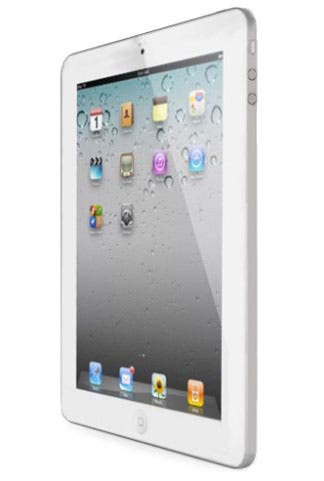
iPad 2 vs. original iPad: what's changed?

Shockingly enough, Apple found plenty of things to tweak and update on its spectacularly successful iPad. Alright, so the screen resolution didn't improve and we didn't get that ultra-speedy Thunderbolt connector on board, but the iPad 2 is thinner and lighter while somehow becoming more powerful -- a 1GHz dual-core Apple A5 SOC lurks within. Check out our full breakdown of the key spec differences in the chart after the break. It's great fun, we promise!
P.S. - While you're poring over these stats, don't forget that Apple's decided to slap a $100 price cut on the original iPads, making them eminently more desirable today than they were yesterday.
iPad![]() | iPad 2![]() |
| Display | 9.7-inch LED-backlit IPS LCD | 9.7-inch LED-backlit IPS LCD |
| Resolution | 1024 x 768 | 1024 x 768 |
| Processor | 1GHz Apple A4 | 1GHz dual-core Apple A5 |
| Graphics | PowerVR SGX 535 | ? |
| Memory | 256MB RAM | ? |
| Storage | 16GB / 32GB / 64GB | 16GB / 32GB / 64GB |
| Front camera | none | VGA |
| Rear camera | none | 720p |
| Cellular radio | EDGE plus triband HSPA | EDGE plus quadband HSPA or CDMA / EV-DO Rev. A |
| WiFi | 802.11a/b/g/n | 802.11a/b/g/n |
| Bluetooth | 2.1 + EDR | 2.1 + EDR |
| Accelerometer | 3-axis | 3-axis |
| Gyroscope | No | 3-axis |
| Thickness | 13.4mm | 8.8mm |
| Weight | 680g (WiFi), 730g (WiFi + 3G) | 601g (WiFi), 607g (Verizon), 613g (AT&T)20 |
Leave A Comment
Subscribe to:
Posts (Atom)